When your IPTV app terminates your savings
Modern mobile threat landscape offers multiple malware families used by lots of single threat actors or organised criminal groups. They are constantly on the lookout for the ways to deliver the Trojans to the victims in the most natural, smooth and unsuspicious way. A modern Android banking Trojan, which is usually distributed through side-loading, must convincingly masquerade as a legitimate application so that it does not raise suspicion and persuades victims to proceed with the installation.
Recent research performed by our Mobile Threat Intelligence (MTI) team revealed yet another Android banking Trojan. We decided to name it Massiv, after one of its components. This new threat, while only seen in a limited number of rather targeted campaigns, already poses great risk to the users of mobile banking, allowing its operators to remotely control infected devices and perform Device Takeover attacks with further fraudulent transactions performed from victim’s banking accounts. The distribution of Massiv highlights another rising trend observed on the mobile threat landscape – threat actors masquerade their malware as IPTV applications, targeting users looking for the online TV applications.
Key takeaways of this report are:
- Massiv is a new Device Takeover malware family without direct links to other known threats.
- Its remote control capabilities lead to confirmed fraudulent cases in southern Europe.
- IPTV applications are increasingly used as masquerading for mobile threats distribution.
Massiv Attacks
Being a modern banking malware family, Massiv supports all the necessary features to be a “successful” threat. It is a powerful tool to perform fraud on mobile devices, equipped with overlay functionality, keylogging, and SMS/Push message interception to obtain sensitive data. Besides that, it is a fully functional remote-control tool, providing its operator with direct access to the victim’s device.
Digital state is opening doors
Overlay attacks serve as an early-stage technique leveraged by Massiv operators to facilitate fraudulent activity. Just like other banking malware families, Massiv monitors applications launched on infected devices and shows a fake overlay if a targeted application is launched by the victim. The fake screen mimics the UI of the original application and asks user to enter credentials and other sensitive information, like credit card details.
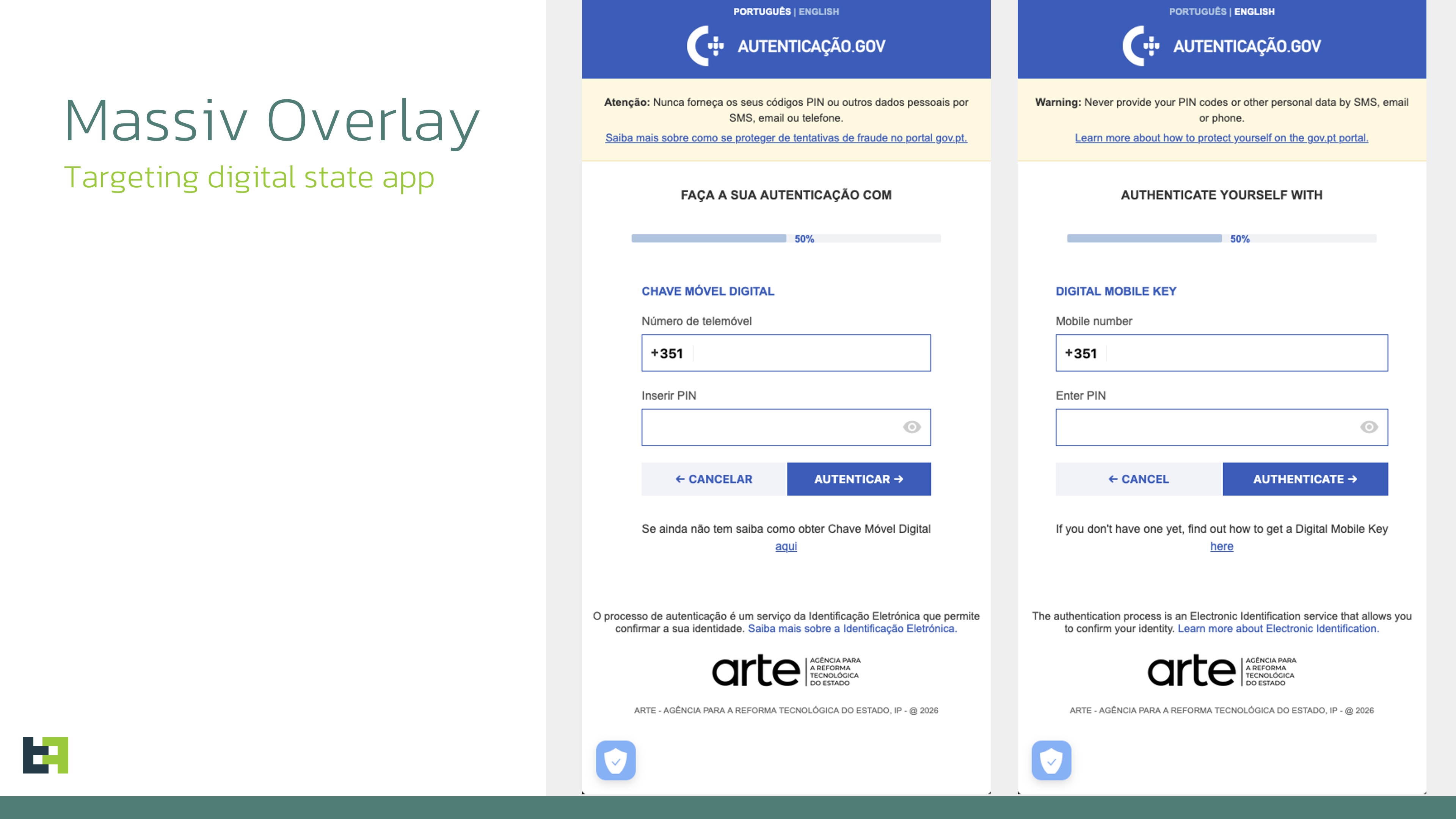
Interestingly, one of the campaigns of Massiv, analyzed by our analysts, targeted Portuguese government application gov.pt, asking the victim for phone number and PIN code. This application serves as a digital identity wallet for Portugal. Criminals are likely targeting it to further use victim’s details to bypass KYC verification that could be done via this application.
It also connects with another service, Chave Móvel Digital, a Portuguese digital authentication and signature system that allows citizens to securely access public and private online services. This includes interacting with online banking, meaning that it can also be used to access the victim’s banking account and perform and approve fraudulent transactions.
MTI research identified cases where new accounts were opened in the name of the victim (user of the infected device) in new banks and services (not used by the victim). Since those accounts are fully under fraudster control, they can further use them as a part of money laundering scheme as well as getting loans and cashing out the money, leaving unsuspecting victim in debts in the bank they never opened account themselves.
Taking over the device
Having the credentials and other sensitive data stolen with overlays and keylogging, Massiv further provides the operator with remote access to the infected device. The FuncVNC class implements a remote visual monitoring and interaction capability built on top of Android’s AccessibilityService. Its functionality establishes a control channel that allows a remote operator to both observe and manipulate the device’s user interface in near real time.
All communication is performed over a WebSocket channel, which acts as the command-and-control (C2) transport for both inbound commands and outbound UI data.
Following the modern trend, Massiv supports 2 modes of operation during a remote control session: screen streaming and UI-tree mode. Screen streaming mode relies on MediaProjection API, effectively sharing the screen content with the remote operator.
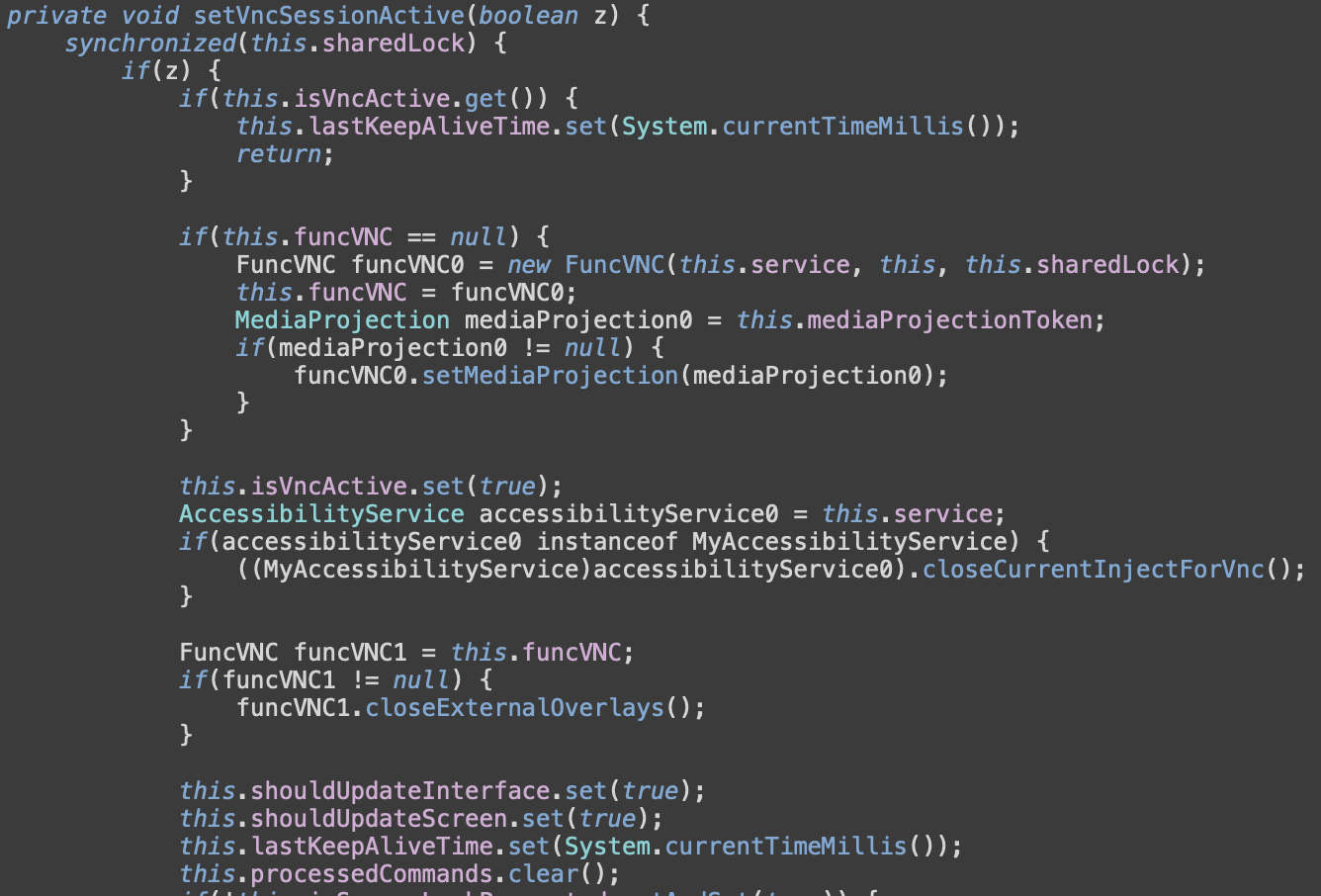
However, some applications implement protection against screen capture. To bypass it, Massiv uses so-called UI-tree mode – it traverses AccessibilityWindowInfo roots and recursively processes AccessibilityNodeInfo objects to build a JSON representation of:
-
Visible text and content descriptions
-
Class names of UI elements
-
Screen coordinates (bounds)
-
Interaction flags (clickable, editable, focused, enabled)
Only nodes deemed “important” (visible and interactive or text-bearing) are exported, reducing noise and focusing on actionable interface elements. This produces a structured interface model rather than raw screenshots. That allows the operator to:
-
Identify specific buttons, input fields, or prompts
-
Understand layout positions
-
Automate interactions based on element attributes.
Massiv implements a set of supported actions that can be performed by the remote operator. The remote control commands supported are listed in the Appendix.
The scariest movie you’ll watch
In the campaign observed by MTI, Massiv is masquerading as IPTV application. These types of applications provide access to online TV services. There are multiple services that provide this – including some that might violate copyright policies, thus not allowed to be distributed via official Google Play Store. In general, users of IPTV applications are used to the fact that these applications are distributed outside of the official store, usually through their own websites or Telegram channels.
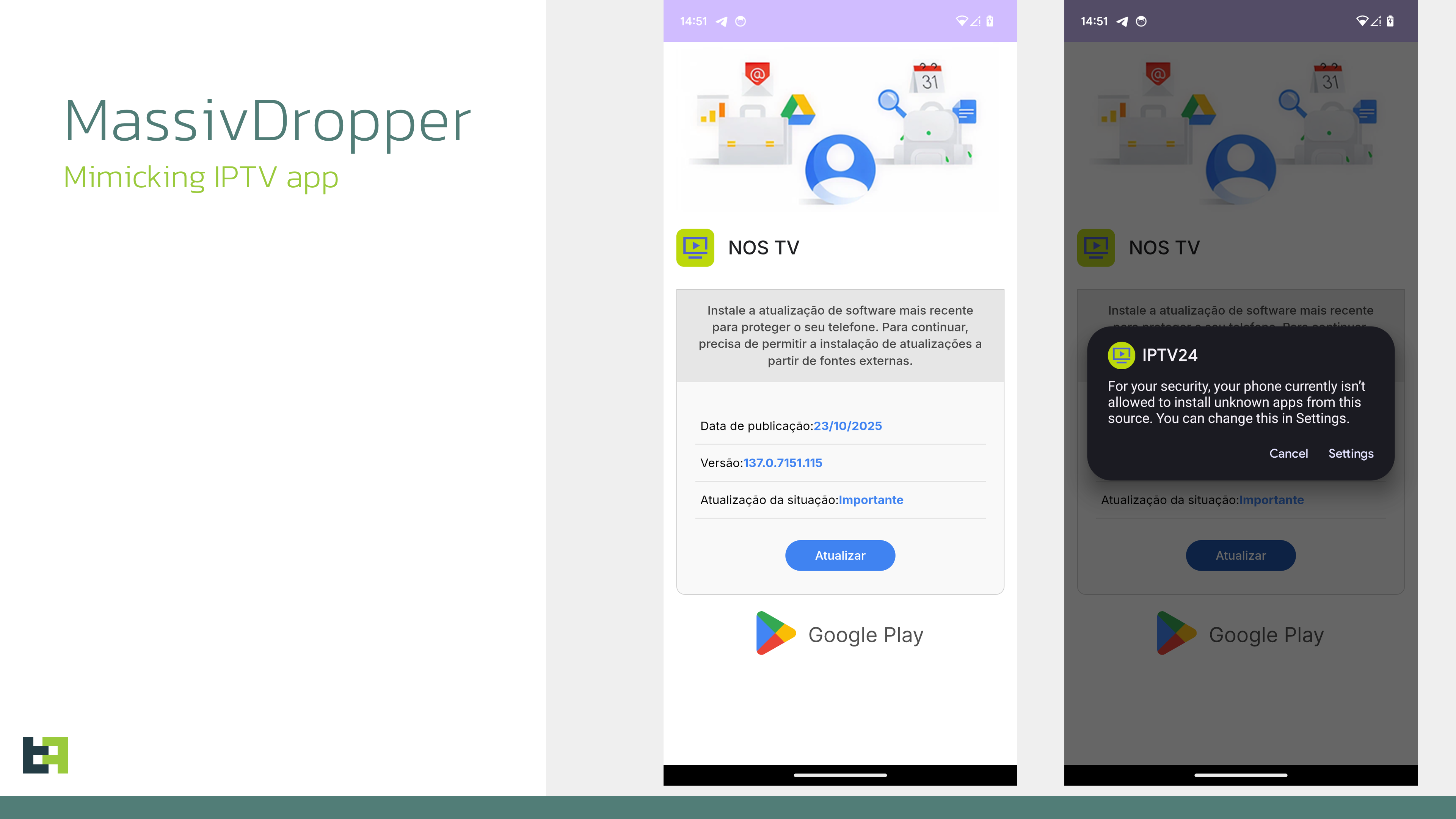
Such an approach is a tasty morsel for fraudsters eager to deliver malware to an unsuspecting victim. Since IPTV users find it very natural to look for these apps outside of the store, creating a fake website of a new attractive app (or faking an existing one) allows threat actors to keep the user unsuspicious about the necessity to install the application from unknown sources. Users seeking “premium” or region-restricted content are already accustomed to bypassing official app stores, reducing suspicion.
In most of the cases observed, it is just masquerading. No actual IPTV applications were infected or initially contained malicious code. Usually, the dropper that mimics IPTV app opens a WebView with IPTV website in it, while the actual malware is already installed and running on the device.
Looking broader on the current mobile threat landscape, we see that Massiv is not the only malware that uses this masquerading. Over past 6-8 months this lure has become increasingly popular, as we observe a rising number of the malware dropper samples masquerading as IPTV applications. Countries that were observed targeting by such masquerading include Spain, Portugal, France, Turkey.
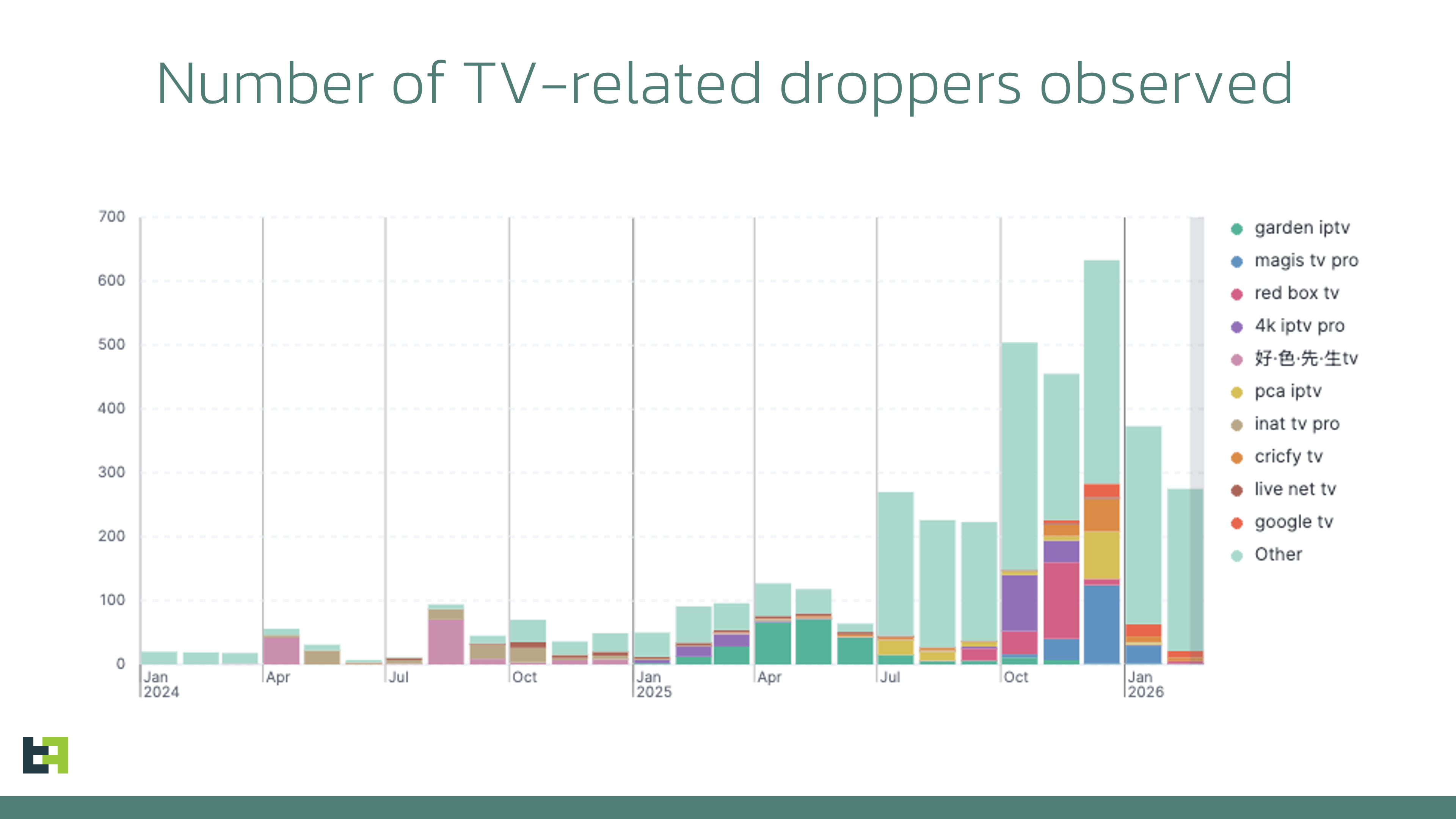
However, our data shows that the most popular masquerading is still browser update, which is also potentially not suspicious for a regular user.
Conclusion
Massiv, being yet another new banking Trojan on the already rich threat landscape, shows continuous demand amongst criminals for such tools. Its capabilities reflect the latest trends and necessity for the fraudsters to perform fraud on mobile channel.
While not yet observed being promoted as Malware-as-a-Service, Massiv’s operator shows clear signs of going this path, introducing API keys to be used in malware communication with the backend. Code analysis revealed ongoing development, with more features likely to be introduced in the future.
Financial organizations are advised to monitor this threat as it has a potential to grow in a proper Malware-as-a-Service; however, remaining privately operated it raises its chances to stay under the radars due to small yet targeted and powerful campaigns, dragging less attention by detection solutions.
Appendix
Indicators of Compromise
|
SHA-256 |
Package name |
Application name |
|
| 54d4cb45fb7a18780ff2ccc7314b9b51ae446c58a179abbf9e62ce0c28539e8e | hobfjp.anrxf.cucm | Google Play | Massiv payload |
| f9a52a923989353deb55136830070554db40f544be5a43534273126060f8c1f6 | hfgx.mqfy.fejku | IPTV24 | Dropper |
Bot commands
| Commands | description |
|
back |
Perform Back global action |
|
blackscreen |
Enable black overlay, mute sounds and vibration |
|
check |
Send an update of device information |
|
click |
Perform click by coordinates |
|
clipboard |
Set clipboard with text |
|
disableBlackscreen |
Disable black screen |
|
disableGraphics |
Turn off screen streaming |
|
enableGraphics |
Turn on screen streaming |
|
fileManager |
List or download specified files |
|
graphicKey |
Unlock the device with pattern |
|
home |
Perform Home global action |
|
inject |
Show overlay for the specified package name |
|
injectPattern |
Show fake screen for device pattern lock |
|
injectPin |
Show fake screen for device PIN |
|
installApk |
Download and install APK from the specified URL |
|
keypress |
Input corresponding symbol in the current text field |
|
overview |
Perform Recents global action |
|
power |
Open the power long-press dialog |
|
push |
Show push notification with specified text |
|
reinitialization |
Perform forced reconnect via WebSocket |
|
renicilization |
Same as “reinitialization”, perform forced reconnect |
|
requestAdmin |
Open Device Admin settings screen, requesting it |
|
requestBattery |
Open Battery Optimization settings |
|
requestFileAccess |
Open MANAGE_APP_ALL_FILES_ACCESS_PERMISSION screen |
|
requestGoogleProtect |
Open Play Protect settings screen |
|
requestInstallPermission |
Request REQUEST_INSTALL_PACKAGES permission |
|
requestMiuiBackground |
Open MIUI-specific AutoStartManagementActivity |
|
requestPush |
Request android.permission.POST_NOTIFICATIONS |
|
requestReadSms |
Request android.permission.READ_SMS |
|
requestWriteSettings |
Open android.settings.action.MANAGE_WRITE_SETTINGS screen |
|
swipe |
Perform swipe by coordinates |
|
swipeDown |
Perform swipe down |
|
swipeUp |
Perform swipe up |
|
uninstallApp |
Uninstall specified application |
|
updateInjects |
Download latest HTMLs for overlay attacks |
|
wakeUp |
Wake up the device |
|
get_backup_addresses |
Save additional C2 addresses |
|
get_files_zip |
Download ZIP archive with overlays for targeted applications |
|
inject |
Mark submitted stolen credentials as processed |
|
log |
Clear logs databases on the device |











Publicar comentário